For almost two decades (!) the de-factor object storage system for Rails apps has been AWS S3. It's resilient (99.999999999% durability!) and Active Storage makes it very easy to use. There was also little competition so it was basically a no-brainer.
We used S3 to store terabytes of customer receipt data for FreeAgent, and 37signals used it to store petabytes of data for Basecamp and HEY (recently 37signals have started moving away from S3, cost being a driving factor). But times change!
S3 has a lot of competition these days so if you're thinking of using object storage for your Rails apps, I no longer think it's the best option. S3 is complicated to configure, it has punishing egress costs, API request costs and it's not priced competitively. There are now lots of alternatives, all of which have S3-compatible APIs, for example:
- Google Cloud Storage
- Azure Blob Storage
- Hetzner Object Storage
- Digital Ocean Spaces
- OVH Object Storage
- Cloudflare R2
I currently host Pagecord and Feedgrab on AWS, mainly because I got $1000 of startup credits which I've been munching through for the past 18 months. That's about to run out, so I've been shopping around for a new hosting provider for both compute and storage. Hetzner are my first choice for compute because it's great value for money. Given this, I thought I'd try their object storage solution as a replacement for S3. It was easy to set up but I couldn't get it working with Active Storage direct uploads (which you'll need if you're using Trix, for example). It's unclear from their website but I don't think it's actually supported right now.
I already use Cloudflare as my DNS provider and for hosting my static sites (including this one) using Pages. I also run Cloudflare in front of my Rails apps which helps with performance and provides DDoS protection. I'm a big fan, so I decided to try their (fairly new) R2 offering as an S3 replacement, and I was sold within minutes!
I quickly set up new buckets, used a brilliant Cloudflare tool to migrate my S3 data over, and had migrated Pagecord away from S3 in no time. Let me explain how.
How to configure your Rails app for R2
R2 is S3 compatible, so it's super-simple to use with Rails.
Create your buckets in R2
Creating a bucket is simple. Log into Cloudflare, head to "R2 Object Storage" and click "Create Bucket".
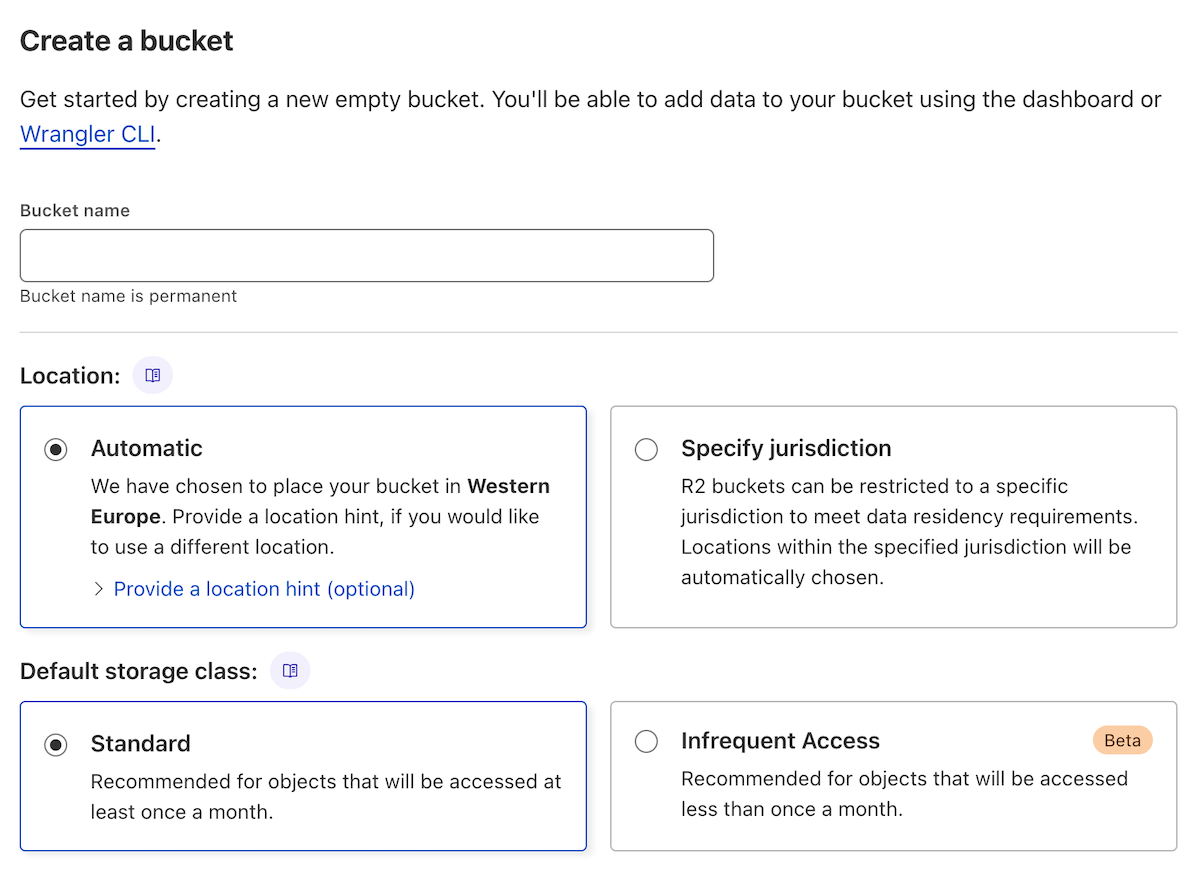
Like S3, you need a unique name and you can specify a region. I used "Automatic" because I'm lazy.
Configure CORS
Go to Settings > CORS Policy and configure it with this replacing <YOUR-DOMAIN> with your own:
[
  {
    "AllowedOrigins": [
      "https://<YOUR-DOMAIN>.com"
    ],
    "AllowedMethods": [
      "PUT"
    ],
    "AllowedHeaders": [
      "Origin",
      "Content-Type",
      "Content-MD5",
      "Content-Disposition"
    ],
    "ExposeHeaders": [
      "ETag"
    ],
    "MaxAgeSeconds": 3600
  }
]
Create an API key pair
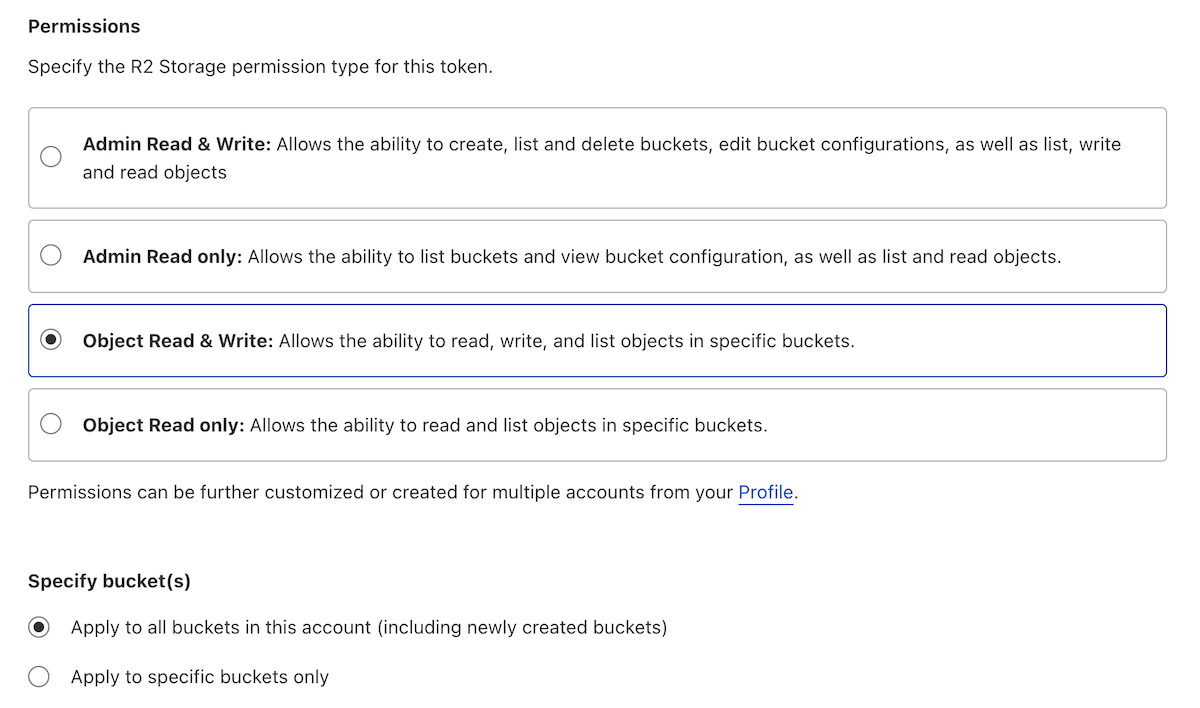
Click on API > Manage API tokens to create a new key pair, just as you do with S3 but without having to suffer the horrific AWS console experience. These are they keys that you'll configure in your app. You can choose the permissions you'll need, but for a Rails app using Active Storage you probably want Object Read & Write. You can also choose whether these API keys access all buckets, or just a specific one (recommended for security).
Configure Cloudflare R2 in your Rails app
In storage.yml, define a new Cloudflare storage location:
cloudflare:
  service: s3
  endpoint: https://[YOUR-ID].r2.cloudflarestorage.com
  access_key_id: <%= ENV["CLOUDFLARE_R2_ACCESS_KEY_ID"] %>
  secret_access_key: <%= ENV["CLOUDFLARE_R2_SECRET_ACCESS_KEY"] %>
  region: auto
  bucket: [YOUR-BUCKET-NAME]
(If you prefer not to use environment variables, replace them with Rails.application.credentials instead.)
Tell your app to use this storage, so in production.rb:
config.active_storage.service = :cloudflare
Deploy!
That's it! That's the basics which should be enough for you to get up and running. You should test it locally first of course, which you can by setting the storage service to Cloudflare in development.rb as well as making sure you add http://localhost:3000 to your CORS configuration 'AllowedOrigins' list.
Using Cloudflare as a CDN for your Active Storage assets
I've written an article about using AWS Cloudfront as a CDN in front of Active Storage which works well, but it's rather convoluted. Moving away from S3 means you can no longer do this, but this isn't a problem because using Cloudflare is just as effective (more so?) and super-simple to do.
Add a Custom Domain to your R2 bucket settings
In the bucket settings there's an option to set a custom domain. It states:
When a custom domain is connected to your bucket, the contents of your bucket will be made publicly accessible through that domain. Websites connected can also benefit from Cloudflare features such as bot management, Access, and Cache.
Sounds awesome!
To set this up, decide on what domain you're going to use (I used storage.pagecord.com for Pagecord) and configure DNS by adding a CNAME (just follow the instructions). If you're using Cloudflare for DNS like I am, this is as simple as clicking the button in the R2 config – it will configure the DNS for you. I'd definitely recommend using Cloudflare as your DNS provider generally.

Set up direct routes for the CDN
(Note: These instructions are the same as from my original article about Cloudfront)
Create a new direct route in routes.rb
This round points to the CDN if ACTIVE_STORAGE_ASSET_HOST is configured:
direct :rails_public_blob do |blob|
   # Preserve the behaviour of `rails_blob_url` inside these environments
   # where S3 or the CDN might not be configured
   if ENV.fetch("ACTIVE_STORAGE_ASSET_HOST", false) && blob&.key
    File.join(ENV.fetch("ACTIVE_STORAGE_ASSET_HOST"), blob.key)
   else
    route =
       # ActiveStorage::VariantWithRecord was introduced in Rails 6.1
      # Remove the second check if you're using an older version
      if blob.is_a?(ActiveStorage::Variant) || blob.is_a?(ActiveStorage::VariantWithRecord)
         :rails_representation
      else
         :rails_blob
      end
    route_for(route, blob)
   end
end
Change the URLs for assets that you want served from the CDN
Update attachment URLs to use the new rails_public_blob_url route:
<%= image_tag rails_public_blob_url(photo.image.variant(:thumb)), id: dom_id(photo) %>
Note: If you’re using Action Text (like I am in Pagecord) you have to can edit the _blob.html.erb partial to use this route, e.g:
html
<% if blob.representable? %>
  <img src="<%= rails_public_blob_url(blob.representation(resize_to_limit: local_assigns[:in_gallery] ? [ 800, 600 ] : [ 1024, 768 ])) %>" />
<% end %>
Tell Rails to use the CDN for service Active Storage assets
Once your custom domain has been added to R2 and DNS has propogated, you can tell Rails about this by setting the ACTIVE_STORAGE_ASSET_HOST environment variable to this domain. So for Pagecord, I set it to https://storage.pagecord.com. Also make sure you've configured your app to use Active Storage Proxy Mode:
config.active_storage.delivery_method = :proxy
Migrate your data from S3 to R2
Before you go live, you need to transfer your data from S3 to R2. This could be done using CLI commands like s3api but Cloudflare have created the Super Slurper to do this for you. It's fantastic!
- In the Cloudflare dashboard visit
R2 Object Storage > Data Migrationand click on 'Migrate Files'. - Enter S3 credentials that have permissions to read from the bucket you're migrating from. Cloudflare recommend creating a new user to do this, which is what I did. They have a detailed guide.
- Next, enter R2 API credentials that have "Admin Read & Write" permissions to your new R2 bucket. You'll need to create a new API token to do this, in the same was as described above.
- Start the migration. This was fairly quick for me, but if you have terabytes of data I'm sure it's going to take a while. Either way, the Cloudflare UI is very informative.
Go live!
Depending on your situation, doing the actual go live can be fiddly. If you have customers adding data every minute to S3, you'll need to manage new things being added to S3 after you've done the migration. Cloudflare have thought of this and you can set up incremental migration on your bucket in advance. This feature means that if an object is requested for R2 that doesn't exist, Cloudflare will go and look for it in your S3 bucket and copy it over if it finds it.
You can configure this in your bucket settings by adding AWS credentials.
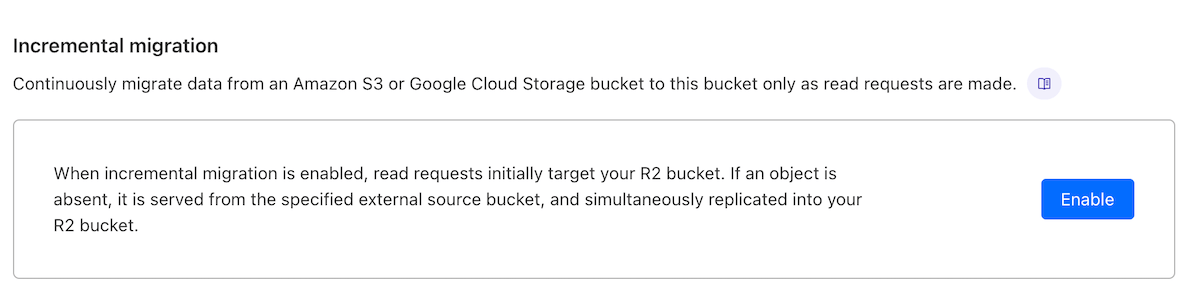
Once your buckets are configured, incremental migration set up and data transferred, you're good to go live!
Pagecord is now up and running on R2 (for both Active Storage assets as well as storing my DB backups) and I couldn't be happier. Assets are snappy, using the Cloudflare dashboard is far more enjoyable than trying to use AWS, and billing is clear and simple (unlike AWS Cost Explorer 💀). What's not to love?